
SIM Cards Registered in Your Name: How many SIM cards are registered in your name? Check here
SIM Cards Registered in Your Name, Check How Many SIM Cards are in Your Name, Check Registered SIM Cards on Your Name, SIM Cards Details Check: Hello friends, today we are going to know detailed information on how to check how many SIMs are in your name.Check All SIM Cards Registered on Your Aadhar Card
Friends, cybercrime is increasing these days. This shows that the number of fraud calls is high. In fact, these fraudsters are calling from numbers that are not their own but they are misusing SIM cards in the name of another person. And often people do not know that someone is misusing their SIM card. So if such a SIM is in your name, then you may have to face trouble in the future. So every person should know how many SIM cards are in his name. If you want to know how many SIMs are active online at home in your name, then read our article today till the end.How Many SIM Cards are Active in Your Name Online
The Government of India has launched a new portal called Sancharsaathi for citizens.Which will be applicable for all states. Through this portal you can check how many SIM cards are active on your Aadhaar card. You can check it. Also, if any other SIM is active in your name, you can report such SIM card and get it closed.
Check how many SIM cards are registered in your name?
Check How Many SIM Cards are Registered in Your Name?,Friends, now let’s find out.TAFCOP PortalHow to check how many SIMs are active in your name via. For this, follow the steps below.
Step 1:Friends, first of all you need to visit the website portal. sancharsaathi.gov.inNeed to go to.
Step 2:Then, after scrolling down a little on the portal’s home page, you shouldKnow Your Mobile Connection TAFCOPYou will have to click on the option.
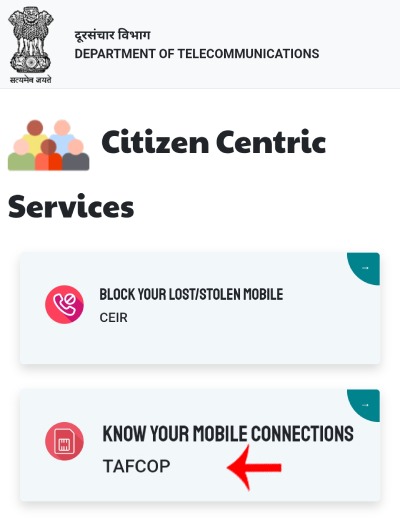
Step 3:NowTAFCOPAfter arriving at the website, you mustLoginYou have to do it. For that you need yourMobile Numbermust be entered and the followingCaptchaYou will have to enter. And after that you will have to send a message to your mobile number.OTPYou will have to enter it. And then click on the log in option.
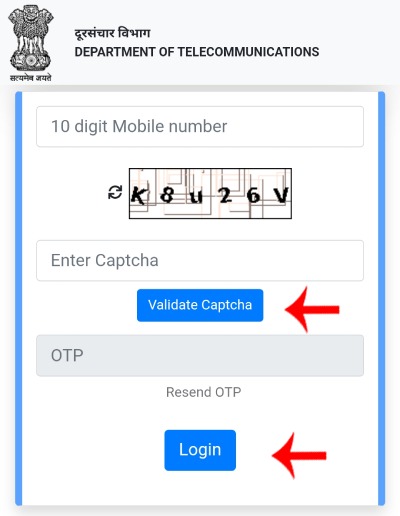
Step 4:Now Next PageWhich SIM card do you have in your name?ActiveYou will see a list of the mobile numbers. The mobile numbers given in this list are shown as the first four and the last four. If you are using all these numbers, then you do not need to do anything.
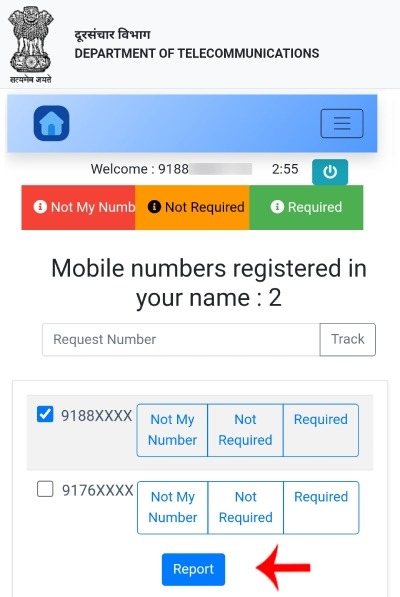
Friends, suppose that any number from the given list is not yours and you want to report it, then first of all you have to select that number. After that, three options are given below that number.
- Not My Number(This means this is not my number. If you do not know this number, you will have to select this option to report it)
- Not Required(Select this option if you have used this number before and if you are not currently using this number and if you want to remove this number from your Aadhaar.)
- Required
Important Links
| TAFCOP Portal | Click here |
| Home page | Click here |
So friends, those numbers that you have never used, you do not know them, while blocking them you have to first select one of the above three reasons i.e. option and then click on the report button.
ReportAfter clicking on the button, your request (report) is accepted. You will get the above message. In this, Complaint Number અથવા Reference NumberOr a reference number is also generated and shown to you. You may want to save this number.
You don’t need to do anything after this. YouMALEYou have reported an unknown or unwanted number to. Your report will now be sent to the company whose SIM you have and the number will be blocked.
So friends, today we have tried to find out how to check how many SIMs are active online in your name. (How to Check How Many SIM Cards are Active Online in Your Name). I hope you liked this article, and you will definitely benefit from reading the information in this article. Also, if you find this article important, then share it with your friends.Thank you.